


Domain update on July 2 Saturday between UTC 8:00 and 20:00
(drawings made during this time may potentially be lost)
WARNING
This Strip is Not Safe For Work!
WARNING
Possibly naughty bits ahead!
Scroll down at your own risk!
Strip ID: 76 Created: 2022-05-30 17:30:15 Panels: 58/99 [Upload][Hidden Feed][Editable][Copy][MultiDraw] Likes: 4 Comments: 12

Group: backdrop
Contributors


backdrop dump for various uses (anim or page backdrops)
feel free to add your own as needed
(you can use any of your own strips of course this is just for those who feel like that would be a waste or just cannot be bothered e.g. yours truly)
Presents
Backdrops
SHOW FRAMES


2022-11-10 23:49:33


2022-07-08 18:58:06


2022-07-08 23:18:31


2022-07-09 06:26:16


2022-07-09 14:00:05


2022-07-10 05:59:05


2022-09-06 07:16:22


doodly forest place
2022-10-16 00:29:16


2022-11-06 05:31:37

2022-11-10 02:21:36

2022-11-10 23:35:26


early 2000s vibes
2022-11-15 04:58:25


2022-11-13 12:28:16


2022-11-14 21:46:32

emerald tiles
2022-11-15 05:12:50

abstract metal looping wires
2022-11-15 13:33:27


slime,,
2026-03-19 21:41:57

2022-11-23 11:14:29


2022-11-28 00:02:52


2024-02-02 18:24:20


2023-04-15 00:56:04

2023-04-20 22:35:37


i could be wrong because i am using a translator (not google) but it should say "nothing makes sense. all of it is just chaos." or something among(us) those lines
2023-04-22 20:24:05


i bet it won't look like i expect it
2023-05-04 20:22:10

2023-08-12 22:49:07

Paneljam reupload
2023-08-27 17:01:05

2023-08-27 23:53:51

2023-08-27 23:59:41


25
2023-09-27 15:59:46


:P
2024-01-20 17:45:13

just trying to give my page a slightly more authentic ytmnd look
2023-11-05 15:54:45

nothing special at all i just wanted something cool looking
2024-02-15 23:45:10

2024-02-20 04:12:57

Peppermint Heaven
2024-02-20 13:06:57


2024-03-06 12:25:23

2024-03-06 12:31:41

2024-03-06 12:32:46

2024-03-06 12:37:01


2024-03-11 01:40:13


g
2024-03-11 07:44:24


Sakura
2024-03-11 20:04:16


2024-03-16 01:37:07

2024-04-05 05:07:51


2024-04-12 12:20:54


triangle hell
2024-05-31 18:27:59


sky?
2024-07-12 14:13:08


2024-11-01 21:26:12


Here's what my art looks like om Ibispaint
2024-11-07 20:32:35

do what you want cause a pirate is free
2024-12-08 23:38:23


Just a Mountainscape
2025-07-08 22:51:03

2025-07-12 03:35:44

2026-01-15 23:15:45

2026-01-16 00:56:27

2026-01-17 04:01:45

2026-01-18 00:58:42


2026-03-07 21:30:00

2026-03-19 23:34:49

2026-04-01 04:35:53

PREV
XXX
NEXT
12345678910111213141516171819202122232425262728293031323334353637383940414243444546474849505152535455565758
LIKES: 4 
Comments
Peyo
2023-08-17 13:23:21
#2
Edit: added upload option
GEO!!
2024-11-07 19:50:58
#3
Hey guys, I don't know how to upload a backdrop, how do I do that (I'm new in this site)
🔳
2024-11-07 20:01:12
#4
`GEO!!` You can upload pictures in the "FX" tab
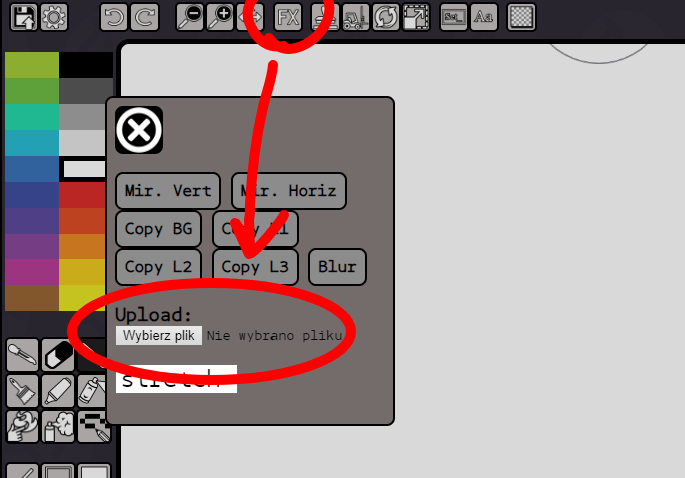
GEO!!
2024-11-07 20:02:34
2024-11-07 20:02:28
#5
`🔳` Thanks but I mean how do I make a backdrop in my profile
🔳
2024-11-07 20:04:14
#6
`GEO!!` You can set your profile background under "settings" on your profile ("set backdrop")
GEO!!
2024-11-07 20:05:49
#7
`🔳` I know but how do I upload the art
🔳
2024-11-07 20:14:14
#8
`GEO!!` You can use any existing panel as a profile background. You could upload the image you want here as a panel, then go to your settings and choose the ID of the strip you want (in this case 76) and then the number of the panel ["image index"] (there are currently 47 panels, so the next one would be 48).
GEO!!
2024-11-07 20:17:07
#9
`🔳` How do I get the strip ID
🔳
2024-11-07 20:25:09
#10
`GEO!!` It's listed at the top of the page, as well as being part of the url ("pchutney.com/strip/X" - X is the strip ID)
GEO!!
2024-11-07 20:25:46
#11
`🔳` Oh ok, thanks
🔳
2024-11-07 20:28:17
2024-11-07 20:26:38
#12
`GEO!!` Additionally, here are some wiki links you might find useful [How to set the backdrop for your Strip?](https://pchutney.com/wiki/doku.php?id=help:pagebg)
[How to use a static backdrop for an animation?](https://pchutney.com/wiki/doku.php?id=help:animbg)
Preview
Comment
